
Lease Management Software for Owners: E-Sign and Clauses

Editorial Staff
Content published by Hemlane is created and reviewed by members of our editorial team, including experienced technical writers and real estate professionals.
Five PDFs. Three email threads. One reminder you forgot to set. That is how a lot of owners run their leases.
Under the paperwork sits a quieter worry. Will a lease signed on a phone hold up? Is your late fee even allowed? Are you handling guarantors the right way?
This guide covers both sides. It shows how software moves one residential lease from approved applicant to renewal. It also covers the legal basics that decide whether that lease stands. You stay in charge the whole way. You call the shots, we handle the rest.
How does lease management software work for residential landlords?
Lease management software keeps one lease in one place, from approved applicant to renewal. You choose the template, approve the tenant and set the terms. The software fills in names and addresses, sends the lease for e-signature, chases signers with reminders, stores the signed copy and flags the renewal date. Every decision stays with you.
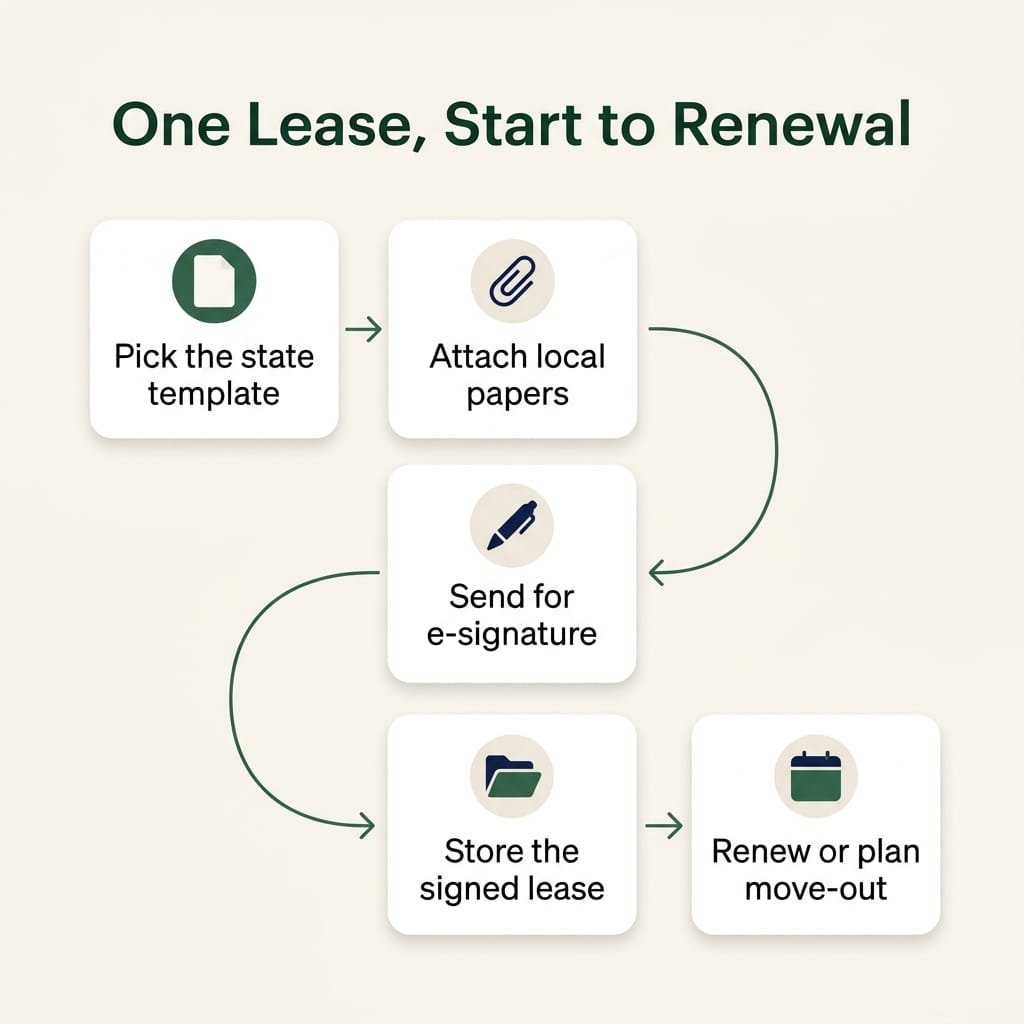
Here is one lease, step by step, the way it runs on Hemlane.
- List and screen. You write the listing and decide who to approve. Hemlane sends one listing to 15+ rental websites and tracks applications with TransUnion-powered screening. The approval is yours.
- Pick the state template. You choose the template for your state. You set the rent, deposit and term. Our state-specific templates pre-fill the listing and applicant details, so nobody retypes an address or misspells a name.
- Add the local attachments. Some cities require papers a state template won't carry. Chicago is a clear example. The city requires its RLTO summary, a short guide to its tenant ordinance, on each written lease and each lease renewal. You know your city. Attach what it requires before you send.
- Send for e-signature. You hit send. The lease goes out in the app. Built-in reminders nudge anyone who hasn't signed yet. No separate signing tool.
- Store the signed copy. The signed lease and the tenant's records live in one place. When a question comes up mid-lease, you open it in seconds instead of digging through email.
- Talk during the lease. Message tenants by SMS and email from the same login. If you want help with the back and forth, a tenant coordinator is available if you need one.
- Renew or plan the move-out. Hemlane sends renewal reminders before the lease expires. You decide what happens next. Renew, change the terms or plan the move-out. A renewal runs through the same template and e-signing. Re-attach any local papers your city requires at renewal too.
One lease. One login. One record. You can see the full feature set on our lease management page.
Are electronically signed leases legally binding?
In most cases, yes. Federal law says a signature or contract can't be denied legal effect just because it is electronic. That is the floor. An e-signed lease holds up best when both sides meant to sign, agreed to sign electronically, and each keeps a copy. A few notices and some state rules need extra steps.
The fear is simple. A tenant disputes the lease later, and the signature turns out not to count. Here is what the law actually says.
The rule comes from the federal E-SIGN Act. You can read the text yourself at Cornell Law School's Legal Information Institute. In plain words: a signature, contract or record in a covered deal can't be thrown out only because it was done on a screen. That's the starting point. The steps below make it hold.
What makes an e-signed lease hold up:
- Intent to sign. Each person meant to sign this lease. Opening it is not signing it.
- Agreement to sign electronically. Everyone agreed to sign on a screen. Say so in your message or in the lease.
- A record of who signed. Each signer signs for themselves, from their own invite. Never sign for a co-tenant.
- A copy each party can get back. Under federal law, a stored electronic copy counts as keeping the contract. It has to show the lease accurately. And everyone entitled to it must be able to open it. Keep yours. Make sure your tenant can get theirs.
Exceptions and state steps to check:
- Default, eviction and right-to-cure notices for a primary residence. The federal e-signature rule does not cover these. Don't send them by e-signature or email and assume they count. Follow your state's notice rules.
- New York rent-stabilized leases. New York lets owners and tenants sign rent-stabilized vacancy and renewal leases electronically only if the tenant gives voluntary written consent on a set form. If several tenants are on the lease, each one must sign that consent, unless they are spouses or domestic partners. New York State Homes and Community Renewal explains the process. This rule applies to New York rent-stabilized leases only.
- Your own state's steps. Other states can add their own requirements. Check yours before your first e-signed lease.
On Hemlane, in-app e-signing with built-in reminders covers the practical side. Every signer gets the lease. Reminders go out until they sign. The signed lease is stored with the tenant's records. The software is the mechanism, not legal cover. This section informs. It does not replace a qualified legal source.
How should landlords handle guarantors and co-signers on a lease?
Treat a guarantor as a written promise, not a handshake. Decide when you'll ask for one, write the rule down, and apply it to every applicant the same way. Get the guarantor's signature on the promise itself. And if a screening report is the reason you ask, you owe the applicant a notice.
The usual case: an applicant almost qualifies. A student. A first-time renter. You want a backstop. There are three ways to add a second person, and they are not the same.
Guarantor | Co-signer | Co-tenant | |
|---|---|---|---|
Lives in the unit? | No | Usually no | Yes |
Owes rent when? | Usually only if the tenant doesn't pay | Often from day one, alongside the tenant, depending on the wording | From day one, alongside the other tenants |
What they sign | A written guaranty, separate or attached to the lease | The lease itself | The lease itself |
Renewals | Check whether the guaranty covers renewals. If not, get a new one signed | Usually signs the renewal too | Signs the renewal |
If rent goes unpaid | You turn to them under the guaranty's terms | You can usually go to them directly | Each is responsible under the lease |
Terms vary by state and by how your documents are written. Read yours.
Put the promise in writing. A guaranty is a promise to answer for another person's debt. Many states won't enforce that promise unless it is written down. Arizona is one example. Its statute of frauds says a court won't hear a claim on a promise to cover someone else's debt unless it is in writing and signed by the person being held to it. Check your own state's version.
Screening reports trigger a notice. The Federal Trade Commission is plain about this. If you require a co-signer based partly or completely on a consumer report, that counts as an adverse action. You must tell the applicant. The notice can be written, electronic or oral.
Same rule, every applicant. Federal fair housing guidance has shifted, and some of it has been withdrawn. The Fair Housing Act itself still applies. So your safest ground is a rule you set before you meet anyone. Same trigger. Same terms. Written down. Asking for a guarantor is never risk-free, and a consistent rule is how you keep it fair.
On Hemlane, screening runs on TransUnion-powered reports. You can message applicants by SMS and email from the same login, and the lease goes out for signature in the app. Whether to ask for a guarantor is always your call.
What lease clauses do owners most often get wrong?
The usual trouble spots are the deposit, the late fee and its timing, the lead paint disclosure on older homes, and local papers that must ride along with the lease. Each is set by your state, your city or federal law. A clause your state won't enforce isn't protection. It's an argument waiting to start.
Most of these mistakes come from a lease copied from an old template or a friend in another state. Here are real rules from real places. None of them is national law unless it says federal.


Clause | Where the rule comes from | Common mistake | Why it matters | How to get it right |
|---|---|---|---|---|
Security deposit | New York | Asking for a security deposit plus last month's rent | New York's one-month limit means you can't ask for both | Stay within the limit. Check your own state's cap |
Late fee amount | New York | A flat fee set without checking the cap | The most you can charge is $50 or 5% of monthly rent, whichever is less | Write the fee to the cap |
Late fee timing | New York | Charging a fee the day after rent is due | Rent counts as late only if it is received more than five days after it is due | Build that grace period into the clause |
Late fee amount | Texas | Using a fee copied from another state | For a home in a building with four or fewer units, a fee is reasonable if it is no more than 12 percent of the rent for the period | Check the fee against that limit |
Lead paint disclosure | Federal, most housing built before 1978 | Leaving it out of the lease packet | Renters have the right to know about lead-based paint and hazards before they sign | Give all available records, the Protect Your Family From Lead in Your Home pamphlet, and a Lead Warning Statement attached to or written into the lease |
Local attachment | Chicago | Attaching the RLTO summary at signing but not at renewal | The city requires it on each written lease and each renewal | Put it in both your lease packet and your renewal packet |
You can check New York's deposit and late fee rules on the tenant page of the New York State Office of the Attorney General. The U.S. Environmental Protection Agency explains the lead disclosure rule.
This is why a state-specific template beats a generic one. Our state templates start your lease from your own state's ground rules, not someone else's, and they pre-fill the listing and applicant details. A template doesn't guarantee compliance. It won't know every city ordinance either. You still read each clause and add your local papers.
Once the clause is right, the money is yours. 100% of late fees go directly to you. Our rent collection tools can apply late fees automatically and collect them with rent.
This table informs. It is not legal advice.
Which features should landlords look for in lease management software?
Look for the features that serve one residential lease from start to finish: state templates, auto-filled details, built-in e-signing with reminders, renewal alerts, secure storage and tenant messaging. Screening, rent collection and accounting links help if you want everything under one login. Lease accounting and commercial cost reconciliation are tools you will likely never use.
Most feature lists out there are built for corporate lessees or commercial buildings. Here is the list for a residential owner.
Feature | Why it matters for your lease | Must-have or nice-to-have |
|---|---|---|
State-specific templates | Starts the lease from your state's rules | Must-have |
Auto-filled listing and applicant details | No retyping. Fewer wrong names and addresses | Must-have |
Built-in e-signing with reminders | Every signer gets the lease and a nudge until it's done. No extra tool | Must-have |
Renewal reminders | You decide on renewal well before the end date | Must-have |
Document storage | A stored electronic copy can meet a duty to keep a contract if it stays accurate and accessible. You and your tenant both need it | Must-have |
Tenant messaging by SMS and email | Lease questions live next to the lease, not in your personal inbox | Must-have |
Tenant screening | Ties the applicant to the lease. Owners who use consumer reports also fall under federal rules on disposing of that data, so how reports are kept and destroyed matters | Nice-to-have, or must-have if you want one login |
Rent collection | Turns lease terms into payments | Nice-to-have |
Accounting integration | Moves lease and rent data into your books | Nice-to-have |
Lease accounting and shared cost reconciliation | Built for corporate balance sheets and commercial leases | Skip |
Hemlane covers every row but the last on one platform. State templates that pre-fill details. In-app e-signing with built-in reminders. Renewal reminders before the lease expires. Tenant records and documents in one place. Screening, rent collection with $0 ACH fees and QuickBooks integrations. Hold our lease management page, linked above, up against this list.
If you want lease and rent data flowing into statements you can share, see our owner financial reports.
The proof is in the numbers. $1.8B in payments processed. A 4.8 average review rating. Owners in all 50 states. Over 20,000 rental properties across 4,418 U.S. cities.
Frequently Asked Questions
How is lease management software different from lease accounting software?
Lease management software runs the lease: templates, signatures, renewals and tenant records. Lease accounting software serves corporate reporting. Take IFRS 16, a corporate accounting rule. It makes a company that leases something record each lease longer than 12 months on its books. The lease counts as something it has and something it owes. Low-value items are the exception. That is a balance-sheet job for corporate lessees. A rental owner rarely needs it. For your own books, Hemlane integrates with QuickBooks.
Should landlords have a lawyer review their lease template?
Often, yes. It matters most for your first lease in a new state or city. A state template is a starting point. It doesn't know every local rule. Chicago, for example, requires its RLTO summary on each written lease and renewal, a step that comes from the city, not the state. A local attorney knows what your city adds. Our state templates give you a clean draft to bring to that review. They don't replace it.
What is the Difference Between Commercial and Residential Property Management Software?
Residential tools center on compliance. Commercial tools center on cost sharing. Residential leases carry more legal protection, because state and consumer laws typically apply only to them. They usually run six months or a year. Most are gross leases, with costs built into one rent. Commercial leases can run 10 years or more. Under a triple net lease, the tenant pays base rent plus a share of the building's running costs. That share includes upkeep of shared areas. Commercial software tallies those charges. Hemlane is a technology company built for long-term residential rentals, so you skip the commercial extras.
Your leases should feel like yours. Clear terms. Signed copies you can find. Renewals you see coming. All of the control, none of the chaos.
Get started with Hemlane
Hemlane, Inc. is a technology company that helps you manage your long-term rental properties. Communications between you and Hemlane are protected by our Privacy Policy. Hemlane also provides access to independent licensed professionals and self-help services at your specific direction. We are not a property management firm. We cannot make any decisions on behalf of any property owners. Any content found in the Hemlane Academy is not a substitute for advice and ideas from a qualified legal source or expert. You are responsible for performing additional research to confirm you are complying with all laws applicable to your rental situation.
Sources


- Cornell Law School Legal Information Institute (15 U.S.C. 7001) — 15 U.S. Code § 7001 - General rule of validity | U.S. Code | US Law | LII / Legal Information Institute · retrieved November 3, 2026
- New York State Homes and Community Renewal (DHCR) — Leases (Security Deposits, Roommates, Sublets, and More) | Homes and Community Renewal · retrieved November 3, 2026
- Federal Trade Commission — Using Consumer Reports: What Landlords Need to Know | Federal Trade Commission · retrieved October 26, 2026
- New York State Office of the Attorney General — Tenants | New York Attorney General · retrieved November 3, 2026
- U.S. Environmental Protection Agency — Lead-Based Paint Disclosure Rule (Section 1018 of Title X) | US EPA · retrieved November 3, 2026
- Cornell Law School Legal Information Institute (15 U.S.C. 7003) — 15 U.S. Code § 7003 - Specific exceptions | U.S. Code | US Law | LII / Legal Information Institute · retrieved November 3, 2026
- City of Chicago Department of Housing — City of Chicago :: Residential Landlord and Tenant Ordinance · retrieved November 3, 2026
- Arizona State Legislature (A.R.S. 44-101) — 44-101 - Statute of frauds · retrieved November 3, 2026
- LeadingAge — HUD Withdraws Wide-Ranging Fair Housing Policies · retrieved November 3, 2026
- Texas Property Code 92.019 (via Public.Law) — Texas Property Code Section 92.019 – Late Payment of Rent; Fees · retrieved November 3, 2026
- Federal Trade Commission — FACTA Disposal Rule Goes into Effect June 1 | Federal Trade Commission · retrieved November 3, 2026
- IFRS Foundation — IFRS - IFRS 16 Leases · retrieved November 3, 2026
- SoFi — Guide to Commercial Lease Agreements | SoFi · retrieved November 3, 2026
- J.P. Morgan — What are Common Area Maintenance (CAM) Charges in CRE? · retrieved November 3, 2026
Get the Latest in Real Estate & Property Management!
I consent to receiving news, emails, and related marketing communications. I have read and agree with the privacy policy.


